
Customer service inside a large organization is rarely simple. Teams sit in different regions, while requests arrive from email, chat, phone, and social channels. And the worst is that workflows evolve as products and policies change. If the systems underneath cannot keep pace, customer experience starts to feel uneven and hard to manage.

Enterprise customer service software helps bring order to that complexity. It keeps conversations connected across channels and teams. It gives support work a clear structure instead of relying on memory or manual coordination. And because it ties directly into the broader customer record, service reflects the full relationship, not just the latest interaction.
This guide offers a practical framework for evaluating platforms that can grow with the business. It focuses on the dimensions that matter at scale and provides a grounded way to assess fit, plan rollout, and set teams up for long-term success.
Table of Contents
- What is customer service software for enterprises?
- How to Evaluate Enterprise Customer Service Tools
- What enterprise-grade features should customer service software include?
- Best Customer Service Tools for Enterprises
- Frequently Asked Questions About Enterprise Customer Service Software
What is customer service software for enterprises?
Enterprise customer service software enables scalable support across brands, regions, and channels. At this size, support teams answer thousands of interactions each day. Systems need to handle volume without slowing down and keep data clear enough for every team to see the same picture. When these pieces align, service feels consistent.
Large organizations tend to outgrow stitched-together tools and point solutions. A unified platform reduces friction between teams and helps conversations move smoothly from one stage to the next.
This is where a platform like HubSpot Service Hub customer service software fits. It combines customer management, automation, and shared records. Plus, Breeze Customer Agent is an AI customer service agent that can resolve common issues across channels and escalate when human support is needed. The result is a support system that grows with the organization.
How to Evaluate Enterprise Customer Service Tools
Evaluating enterprise customer service platforms calls for more than feature comparison. Growth brings more teams, regions, regulations, and data to manage. A platform needs to keep pace with that expansion and adapt without forcing major rebuilds.
Before selecting the right customer service tool, it’s best to evaluate it based on organizational complexity, global footprint, data strategy, AI governance, extensibility, and operating model.
Organizational Complexity
Organizational complexity shows up fast in large service teams. Multiple departments address the same customers, but roles vary by region. Beyond that, some groups specialize, while others handle broad support. A platform needs to match that structure rather than force teams into a single workflow.
Clayton Eidson, founder and CEO of AZ Health Insurance Agents, describes this need through the lens of constant operational change in his organization. He explains that their teams work with shifting policies and carrier requirements, and the support system has to adjust with them.
As he puts it, “In the field of insurance, nothing remains the same.” He shares that the tool they chose needed to support custom processes and allow teams to move in sync across locations. He emphasizes that if the system could not adapt, they would be forced to rebuild workflows each time their business evolved.
Key takeaway: The platform must map to real team structures and allow each group to work in a coordinated way without manual patchwork.
Global Footprint
Global operations introduce a level of coordination that goes beyond simple time zone differences. Teams spread across regions must follow the same standards without losing the flexibility to work within local norms. Policies and workflows need to feel consistent, or the customer experience starts to fracture. The right platform holds all of this together.
Sid Jashnani, founder and CEO of Rekruuto, shares how this plays out in their work embedding offshore professionals for clients in the U.S., Australia, and Europe. He says the goal is to keep the experience uniform across every client engagement.
According to Jashnani, the team’s platform needs to centralize core practices like SOPs and task management, while still letting each region align to its own work hours and collaboration rhythms. He notes that this approach kept operations coordinated without forcing separate systems for each location.
Key takeaway: The platform should maintain one operational backbone while allowing flexible local execution.
Data Strategy
Data strategy becomes a defining factor once service operations expand. Information comes in from many touchpoints, and every team depends on consistency in how that information is captured and interpreted.
Without a unified approach, insights fragment, which stalls decision-making. A strong data foundation keeps service performance measurable and actionable as the organization grows.
Arthur Favier, founder and CEO of Oppizi, describes how this played out while building their offline marketing platform.
Favier says precision shaped every decision because offline campaigns had historically been difficult to measure. He explains that their operations involved the daily delivery of around 10,000 flyers, along with QR code interactions happening across multiple cities at once.
The system needs to collect and process data from these physical touchpoints in real time. During peak months, he notes that the system handled about 1.2 million individual interactions. In his words, “A strong data strategy allowed us to build tools that not only showed results but helped clients improve campaigns while they were running.”
Key takeaway: The platform must unify data across channels and make it usable in real time.
AI Governance
AI now plays a direct role in how enterprise service platforms categorize inquiries, suggest responses, and guide agents during live work. That creates value only when the system provides clarity about how decisions are made and where data travels. Governance is not an add-on. It determines whether AI strengthens customer trust or erodes it.
Mircea Dima, co-founder and CEO of AlgoCademy, described this as the defining factor when evaluating platforms for their learning environment.
He says their engine relies on machine intelligence to evaluate student work, which means every feedback loop influences the learning experience. He explains that they required full transparency into how data was stored and processed because any hidden bias or unclear model logic could undermine trust.
He says, “The existence of every feedback loop and performance score influences the experience of the learner.”
Dima notes that their system records more than 10,000 AI-driven interactions each day, and compliance with GDPR and educational data privacy was non-negotiable. He also highlights the importance of model explainability, configurable moderation layers, and human override controls so decisions can be traced and verified.
Key takeaway: The customer service software must make AI behavior transparent and controllable, with safeguards that preserve trust.
Extensibility
Customer support no longer sits on its own. It connects to marketing, product, billing, and data teams. New channels appear, and expectations shift. The platform has to stretch with those changes instead of forcing workarounds.
Matt Bowman, founder and CEO of Thrive Local, shares how this shaped their evaluation process. He says their reputation management work touches customer sentiment, lead follow-up, and ongoing client relationships.
He explains that they handle thousands of review signals every month. New platforms rise in relevance quickly. The system they chose needed to expand without disruption. He notes that their requirements included:
- Open APIs for integrations.
- Modular components that could be added without rewriting core workflows.
- Webhook-based updates to keep information aligned across internal systems.
He offers a recent example. When a new review network gained traction, his team connected it to their platform within two weeks and enabled live sentiment tracking without reworking the existing code. He says that extensibility turned their platform into something that could “adapt alongside our clients and markets.”
Key takeaway: The platform should grow without forcing teams to rebuild the foundation each time something new changes.
Operating Model
The operating model sets the rhythm of how work moves through a service organization. It defines handoffs, responsibilities, review points, and the pace of delivery. The technology has to reinforce that rhythm. If the platform cannot support how work is meant to flow, teams spend their time compensating for the system instead of serving customers.
Austin Rulfs, director at Zanda Wealth Mortgage Brokers, frames this as the core decision-making lens in his firm. He says their brokerage handles a national client base while coordinating brokers and analysts moving 120 to 150 live loan files at once.
Settlement depends on speed and accuracy. He explains that they redesigned their process to reduce the number of touches per file and shorten lender cycle time. After the change, the average time from application to formal acceptance dropped to 6.8 days. File touches fell from 14 to 9. Brokers gained about 2.3 hours per file, which could be directed to client work rather than internal administration.
Key takeaway: The platform must support how work is actually done, not the other way around.
Bear in mind that the total cost of ownership is driven by licenses, services, admin effort, integrations, support, and migration.
What enterprise-grade features should customer service software include?
Enterprise customer service software should include role-based access, omnichannel SLAs, workflow automation, analytics, and AI governance.
Enterprise Capability Checklist
- Role-based access control (RBAC). Permissions match real team structure, so data stays protected and work stays clear.
- Sandbox environment. Changes can be tested safely before they affect live customers.
- Omnichannel SLAs. Response and resolution expectations remain consistent across every channel.
- Analytics and reporting. Performance, volume, and customer outcomes are visible in one place for leaders and operators.
- Audit tracking. Every change to workflows, records, or permissions is logged for compliance and accountability.
- App framework and integrations. The platform connects smoothly to CRM, data warehouse, telephone, and internal systems without rebuilds.
Help Desk and Workflow Automation
An enterprise help desk creates a single point of coordination for incoming requests. Ticketing systems gather inquiries into one queue, assign ownership, and track progress from intake to resolution. This structure keeps work accountable. Service levels remain consistent because every request follows the same path instead of relying on individual habits or local workarounds.
HubSpot Help Desk Software allows customer service to provide personalized, AI-powered support to customers. All inquiries across channels become tickets that connect directly to your CRM, making it easier to track and resolve issues. The Help Desk helps agents work more efficiently and reduce errors across all support channels.
A workflow builder strengthens that foundation by removing the manual steps that slow teams down. This eliminates the “swivel-chair” effort of copying information between systems. Research from Kissflow shows that most organizations see measurable efficiency gains within their first year of workflow automation, which reflects how quickly these improvements compound.
Enterprise support patterns fit into these capabilities. Tiered escalation builds from a frontline response to specialized support. Regional handoffs move cases across time zones. Compliance reviews follow clear checkpoints. The help desk provides the structure, and automation ensures each step happens when it should, with less effort from the teams involved.
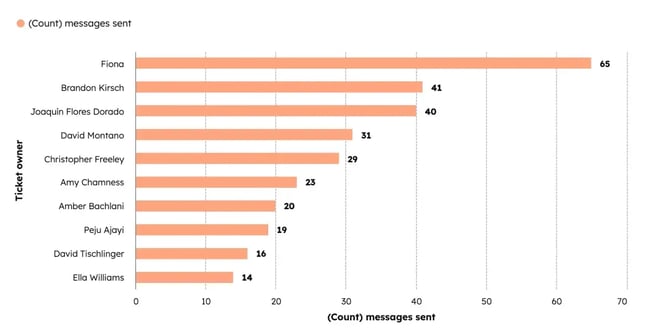
HubSpot Service Hub provides tools for automated customer service that quickly route tickets to specialists with AI-powered automation. The system also sends feedback surveys to customers and follows up automatically. It allows support teams to close more tickets with integrated CRM and service data.
Omnichannel Communication
Integration across a team’s support stack happens through event-based syncs. The customer service platform connects to the CRM to pull in account history. It exchanges conversation information with the data warehouse for reporting. The goal is a single conversation timeline, not separate systems holding pieces of the story.
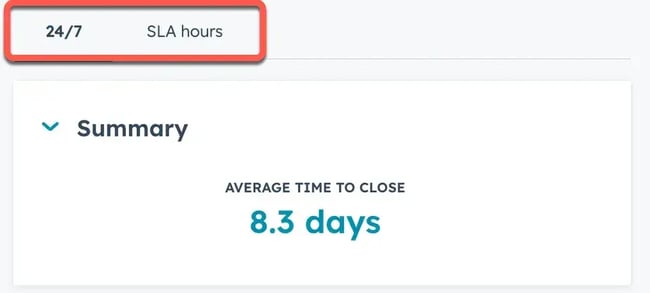
Omnichannel software brings every communication channel into one workspace so the conversation remains intact even when it moves between email, chat, voice, or social. Routing then assigns each inquiry. With strong SLA management, deadlines stay visible, and the most urgent issues receive attention first.
HubSpot Service Hub — through its Omnichannel Customer Service offering — enables companies to deliver unified, personalized support across all channels. It centralizes every interaction in a single workspace, preserving full conversation history even if a customer switches channels, and gives agents complete context so customers don’t have to repeat themselves.
The benefit shows up in both the day-to-day and the strategic view. Agents work with full context and fewer tools. Leaders see performance patterns across channels rather than in isolated reports. The organization responds consistently, even as volume increases or conversations span regions and time zones.
Knowledge Base and Self Service
A knowledge base does more than store answers. It becomes the first line of support. When customers can solve a problem on their own time, resolution happens faster, and satisfaction rises. This is the core of a deflection strategy: shifting repeat inquiries to a self-service channel that is always available and scales without friction.
Keeping that channel reliable requires intention as content changes and products evolve. Governance gives the knowledge base its durability.
Large libraries only work when they are easy to navigate. Taxonomy provides that clarity. Articles are grouped by purpose rather than department. Search surfaces the right information. The result is a self-service experience that feels usable, not overwhelming.
A well-structured knowledge base becomes part of the service model itself, reducing load on support teams while maintaining consistency across brands and regions.
Pro tip: Use HubSpot’s Knowledge Base Software to create self-help articles, allow easy browsing, and offer your customers AI-powered insights.
Service Analytics and Forecasting
Enterprise-grade service analytics turn day-to-day support data into a clear operational picture. Dashboards track key metrics like ticket volumes, response times, backlog forecasts, and customer sentiment. These insights give managers a way to spot bottlenecks early and identify training needs before they affect service quality.
What makes this especially powerful for large organizations is how tightly analytics connect with existing systems. When the CRM feeds into downstream finance reporting, every insight becomes part of a larger story. This integration turns analytics from static reports into a dynamic decision-making engine that helps leaders plan ahead with confidence.
Best Customer Service Tools for Enterprises
Platform | Core Strength | AI + Automation | Omnichannel Support | CRM / Data Integration | Pricing (Enterprise-Level Reference) | Best Fit For |
HubSpot Service Hub | Unified customer platform connecting service, sales, and marketing | AI agents, workflow automation, knowledge base automation, customer health scoring | Live chat, email, voice with call flows, and IVR | Native CRM integration with full lifecycle visibility | $150 per seat/month | Enterprises that want customer service deeply connected to revenue, retention, and lifecycle insights |
Intercom | AI-forward service and support workspace | Fin AI Agent and AI Copilot for drafting, triage, and resolution | Chat, email, social messaging through unified inbox | Integrates with CRM systems, does not include one natively | $0.99 per resolution + $29 per seat/month (varies by volume) | Teams prioritizing agent efficiency and conversational support with strong automation |
Zendesk | Mature enterprise ticketing with deep configuration | Workflow automation and AI assistance for routing and replies | Email, chat, phone, social messaging unified in queue | Broad integration ecosystem across CRM and data systems | Starts at $55 per agent/month, tiers expand with complexity | Large organizations that need established support structure and flexible configuration |
Help Scout | Shared inbox collaboration that stays approachable for teams | AI-assisted reply drafting, summaries, and self-service suggestions | Email, chat, help widget with proactive messaging | Light CRM context built-in, integrates with external CRMs | Contact-based billing, unlimited users, enterprise by quote | Teams that want a familiar feel with enough workflow structure for scale |
Freshdesk | Straightforward rollout with scalable ticketing and collaboration | Freddy AI for response drafting, triage, categorization, and sentiment insights | Email, chat, phone, social unified into ticket queue | Integrates with CRMs and data systems through connectors | ~$79 per agent/month (Enterprise tier, billed annually) | Organizations that need fast adoption and clear workflows without heavy configuration requirements |
1. HubSpot Service Hub
HubSpot Service Hub is an enterprise customer service platform. It is AI-powered and designed for omnichannel support. It connects directly to marketing and sales data within a unified customer platform, so every interaction reflects the full customer relationship.
Features
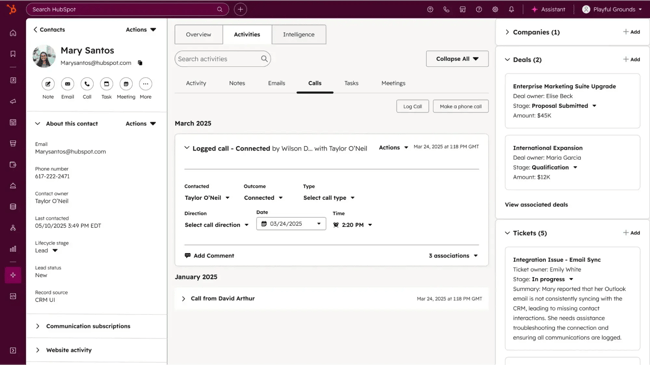
- Help-desk workspace. HubSpot Service Hub provides an AI-assisted help desk for managing inquiries in one shared workspace. Tickets stay organized. Routing aligns work to the right teams. Support teams see progress and ownership without switching tools.
- Omnichannel communication. Support can move across live chat, email, call flows, and other channels while maintaining context. Conversations stay continuous even when customers change how they reach out.
- Call tracking and IVR. Built-in call tracking and IVR allow organizations to structure phone support at scale. Calls can route to the right specialists, and teams can handle transfers without losing the conversation state.
- SLA management and service analytics. Service Hub supports conditional SLAs and automated routing rules. Teams can track performance and respond to trends using real-time dashboards and prebuilt analytics.
- Automation and AI-powered tasks. Routine work can be handled by automation. Features like the Breeze Customer Agent and knowledge base assistant convert repeated interactions into reusable content. This reduces manual handling of common requests.
- Success and retention tools. Because Service Hub is part of the HubSpot platform, teams can use customer health scoring, NPS, and CSAT feedback collection, journey analysis, and signals that highlight upsell or cross-sell opportunities. This links support outcomes directly to long-term customer value.
- Knowledge base and self-service. Teams can create knowledge bases and secure portals that allow customers to resolve their own questions at any time. This deflects repeat inquiries and preserves agent capacity for more complex issues.
- Full CRM integration and ecosystem. Service Hub draws from the same records used in marketing and sales and connects to HubSpot CRM. Smart CRM unifies customer data for analytics and integration. Support teams see customer history in full, from first contact to renewal. This prevents fragmented context and strengthens continuity of service.
Pricing
Pricing begins at $150 per core seat per month for the Enterprise tier. A minimum of 10 seats is required. This includes skill-based routing, conditional SLAs, IVR, multi-knowledge base support, and team role management. Larger deployments may include onboarding or setup costs.
What I Like
In my experience, HubSpot Service Hub stands out from most other service software for enterprises because it combines a full CRM with powerful customer service tools in one platform. It offers advanced ticketing, automation, knowledge base management, and reporting, all tied to rich customer data for a complete view of interactions. The interface is intuitive and approachable, while still supporting enterprise needs like SLA management, multi-team routing, and in-depth analytics.
2. Intercom
Intercom offers a customer service suite built around AI-assisted support and a help desk in one platform. The system is designed to improve efficiency by allowing automation to handle routine inquiries while agents focus on complex or relationship-driven conversations.
Features
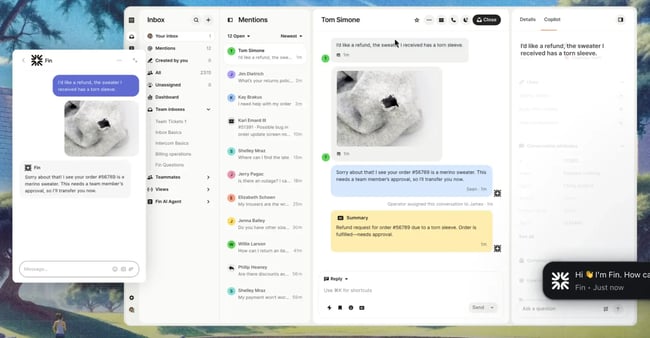
- Unified inbox. Support teams work from a single inbox that brings conversations from different channels together. This keeps context intact and allows multiple team members to collaborate without shifting between tools.
- Ticketing and workflow management. Workflows route inquiries to the right team and prioritize requests according to urgency or customer type. Handoffs happen within the same environment, which helps maintain continuity of service.
- Agent Copilot. AI assists support teams by suggesting responses, generating summaries, and providing relevant context. This helps agents move faster and spend less time searching for past information.
Pricing
Pricing begins at $0.99 per resolution + $29 per seat per month with a 14-day free trial. The final cost depends on resolution volume, seat count, channels, and optional AI or integration features.
What I Like
Intercom balances automated support with tools that lift the work of human agents. The Fin AI Agent manages high-volume questions, and Copilot strengthens agent performance in real time. The unified inbox and workflow automation help large teams stay coordinated and deliver consistent service across channels.
3. Zendesk
Zendesk is an enterprise customer service software designed to support high-volume interactions across many channels. It focuses on making complex support operations feel manageable for teams while maintaining a consistent customer experience.

Features
- Omnichannel ticketing. Zendesk converts inquiries from email, chat, voice, social, and messaging apps into one coordinated queue. Support teams work from a shared record instead of switching tools. Zendesk reports that organizations using this approach see reply times improve by 61%.
- Automation and AI. Repetitive tasks and routing rules are handled through automation, allowing agents to spend more time on higher-value support. AI-driven workflows help teams scale without adding unnecessary manual steps.
- Custom workflows and integration. Zendesk can be configured to match complex team structures. Workspaces, workflows, and integrations can align with existing systems and business processes at enterprise scale.
Pricing
Zendesk’s pricing follows its Suite plan model. Plans begin at $55 per agent/month billed annually, which includes core omnichannel ticketing, automation, and self-service features. Higher-tier plans add advanced analytics, AI-driven workflows, and more customization for larger organizations. Enterprise pricing becomes more tailored as scale, compliance requirements, and integration depth increase.
What I Like
I like the organization and structure of Zendesk’s Support Suite. It provides a clear way to assess the types of support inquiries coming in and accurately measure team responsiveness. Having a centralized workspace that’s accessible to multiple users eliminates the chaos of managing a shared inbox.
I also appreciate how pre-built macros streamline repetitive tasks, reducing the effort spent on tickets while maintaining quality. The clear visibility into “resolved” and “closed” tickets gives the team a tangible sense of progress and accomplishment — something every support operation values.
4. Help Scout
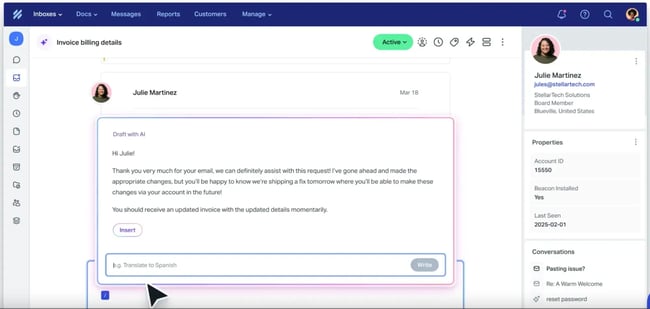
Help Scout is a customer support platform built around a shared-inbox model, combining email, live chat, and self-service tools into one workspace for teams. It’s designed to feel familiar (like email) but introduce support-specific workflows, so it works both for smaller teams and for larger operations.
Features
- Multichannel conversations. For enterprise teams, the shared inbox becomes a central place where every conversation flows. Agents and stakeholders can collaborate using internal notes and mentions. Work stays coordinated even when many people contribute to the same customer conversation.
- AI-assisted support. Help Scout offers AI features that help draft replies, summarize long conversations, and maintain consistency across responses. The system can also support self-service by using knowledge base content to answer repeat questions.
- Proactive messages. Help Scout allows teams to deliver contextual prompts inside apps or on websites. These can support onboarding, gather feedback through surveys, or announce changes.
Pricing
Help Scout charges based on the number of contacts helped each month rather than charging per user. Unlimited users are included at every tier.
Enterprise tiers begin at 1,000+ contacts per month and are priced by quote. They include higher-security controls and dedicated onboarding.
What I Like
Help Scout combines a friendly, intuitive interface with enterprise-ready power. Its shared inbox model keeps the learning curve low, while features like automation, workflows, analytics, and integrations scale for large teams. That said, even though it has a “CRM lite” feel to it, though not a full CRM, it still lets support teams manage customer data and maintain context across interactions.
5. Freshdesk
Freshdesk, from Freshworks, is a cloud-based customer service platform that brings email, chat, voice, and social support into one environment. It is designed to expand as usage grows and includes automation and analytics that help large teams maintain consistency at scale.

Features
- Ticketing and unified inbox. All incoming requests from email, chat, social, and voice channels are captured as trackable tickets. Each ticket carries status, priority, and ownership. This keeps work organized and prevents requests from slipping through gaps when volume increases.
- Automation and routing. Freshdesk supports automation rules that assign tickets, trigger escalations when SLA thresholds are at risk, and route work based on skills, workload, or language. This reduces manual coordination and helps teams maintain steady response times.
- Threads and tasks. Internal discussions can happen directly inside a ticket without affecting the customer-facing conversation. Teams can also create linked tasks that clarify next steps. This keeps collaboration structured and ensures that responsibilities are clear.
Pricing
The Enterprise plan is approximately $79 per agent/month when billed annually. It includes skills-based assignment, audit logs, and enhanced security controls suited to larger organizations.
What I Like
The interface is clean, clear, and easy to become comfortable with, so even teams without deep support-tool experience can get started smoothly. Many features work out of the box, and the guided onboarding helps make the transition faster. The minimal technical barrier means less friction in rollout, which is especially valuable when service teams are juggling multiple priorities.
Frequently Asked Questions About Enterprise Customer Service Software
How do we validate AI accuracy and reduce hallucinations?
AI accuracy is maintained by setting acceptance thresholds that define when outputs are trustworthy enough to use. For example, a chatbot may require a 90% confidence score before sending an automated reply, while anything lower routes to an agent for review. A human-in-the-loop review process ensures quality in ambiguous cases.
What’s the best way to handle data residency and cross-border data flows?
The best way to handle data residency and cross-border data flows is through a combination of vendor controls, regional deployments, and data minimization. Vendor controls ensure compliance with frameworks like GDPR or CCPA by enforcing encryption, role-based access, and transparent subprocessors. Regional deployments keep data within specific jurisdictions to meet residency rules and reduce latency.
How should we plan a migration from a legacy platform without disrupting support?
To plan a migration from a legacy platform without disrupting support, it’s worth running systems in dual mode for a period, so both old and new platforms handle requests simultaneously while teams verify data and workflows.
Shadow routing can be used to test automated routing and ticket handling on the new system without impacting real customers. Finally, phased cutovers — migrating one team, channel, or region at a time — help ensure continuity of service while gradually transitioning.
When should you introduce AI agents vs agent assist?
Introducing AI in customer service is most effective when done in stages. It’s worth starting with AI-assisted features, such as drafting responses, summarizing tickets, or suggesting knowledge base articles. Once workflows are well-documented, AI agents can be introduced to handle end-to-end interactions.
How do we avoid vendor lock‑in over time?
To avoid vendor lock‑in over time, it’s worth adopting an API‑first approach. This ensures flexibility and makes switching vendors easier if needed. Additionally, establish clear data export policies so customer and operational data can be retrieved in standard formats. Teams should also implement strong governance practices to document custom workflows and business logic.
Evaluating Enterprise Customer Service Tools for Long-term Growth
Customer service software for enterprises matters because large organizations need coordinated support across brands, regions, and channels. The most effective systems match real operational structures. Alignment determines whether the platform grows with the organization or becomes a constraint.
HubSpot Service Hub brings these capabilities together in one customer platform, connecting service data with sales and marketing context and supporting automation, routing, and self-service at scale. Platforms work best when they reduce complexity rather than add to it.
Service Hub has shown strength in that regard by remaining approachable for teams while still meeting enterprise expectations for analytics, permissions, and structured workflows. Ready to see how this works in practice? Get a demo.
